A cheap replacement part or repair quote can look like a saving until it proves incompatible, lacks a workable procedure or leaves you unable to verify the result. Before you buy a part or authorise work, make the decision around your exact model, the documented repair path and what you will check afterwards.
Before You Pay: The UK Parts-and-Repair Check
Start with the phone’s exact model, not just its brand or screen size. Keep the model code, storage variant and the fault you are trying to fix alongside the listing or quote. Then ask five questions: is the part presented as genuine for that model; is there a model-specific guide; what tools and steps are involved; what happens if the attempt causes damage; and how will the completed repair be checked?
Official repair programmes show why this order matters. Samsung’s UK Self-Repair programme offers original parts for some products and says that manuals and repair guides can be found by entering a model code or searching by category. Google Pixel owners can find model-specific genuine parts, kits and repair guides through iFixit’s UK Google parts catalogue. Those examples are useful starting points, but neither makes every repair suitable for every owner.
Do not treat a listing’s availability as proof that the part fits, that the fault has been diagnosed correctly or that the repair is economical. If a seller, repairer or official source cannot help you complete the checks below, pause before paying.
Confirm the Part Is Genuine and Appropriate for Your Exact Model
Use the model identifier to narrow the search before comparing prices. A credible listing should make the phone generation and the component clear: for example, a battery, display, charging port or camera for one named model. Avoid assuming that a part for a similarly named handset, a different regional variant or a later generation will work.
Provenance deserves the same level of attention. Samsung states that its UK Self-Repair programme sells original spare parts for supported Samsung products. The iFixit UK Google Phone catalogue describes its Pixel range as genuine Google parts and repair kits, and separates products by individual Pixel models. These are documented sources, rather than a general claim that every online marketplace listing is genuine.
Before checkout, save the part name, model compatibility statement, returns terms and the source page. If you are using a repair shop, ask for the same information in the quote: the supplied part, the exact model it is intended for and what will happen if it is not suitable. A low headline price is not directly comparable with a quote that identifies the part and includes fitting or follow-up support.
For an iPhone, genuine status is also not simply a promise made before purchase. Apple says that Parts and Service History can show information about some repaired components after a repair, depending on the iPhone model and iOS version. Build that later check into the decision rather than relying only on wording in an advert.
Find a Model-Specific Manual and Assess the Repair
Find the procedure before you order the part. Samsung says that some supported products have downloadable repair instructions and repair kits, and that users can locate manuals and repair guides by model code or product category. Its UK Self-Repair pages also point to how-to support for tasks such as screen, charging-port and back-glass repairs on certain Galaxy devices.
A model-specific manual lets you turn “I could buy the part” into a practical assessment. Read it far enough to identify the opening method, the tools or kit required, whether adhesive or other consumables are needed, the order of the main steps and any diagnostic stage. If the guide is for another model, or stops short of the component you need, it is not a dependable substitute.
Google Pixel owners can use the iFixit UK catalogue as another example of the useful pairing: it lists genuine Pixel parts and says that it provides free, in-depth repair manuals. Match both the part page and the guide to the same device before treating them as a repair route.
Samsung’s programme covers more than phones: it lists Galaxy smartphones, tablets and laptops as well as selected refrigerators, washing machines, dishwashers, televisions and monitors. That range illustrates an important limit: official self-repair availability is product- and programme-specific. Check the page for your own model rather than extending a category example to your handset.
If you cannot find a credible, model-specific procedure, professional repair or replacement is usually the more defensible next comparison. You have not yet established the tools, process or realistic risk of DIY work.
Check Warranty, Safety and Professional-Repair Boundaries
A repair manual is not a blanket permission to proceed. Samsung’s UK Self-Repair information says that damage caused by an attempted repair by anyone other than a Samsung Authorised Service Centre is not covered by warranty. That makes the warranty position a pre-payment question: check whether the device is still covered, which damage is already outside cover and whether an attempted DIY repair could leave later damage uncovered.
Separate a known, contained fault from an uncertain one. A documented part and guide can help with the former, but they do not diagnose every symptom. If you cannot confidently connect the fault to the planned component, ask a professional repairer for an assessment and compare that cost with replacement. The same applies when the manual, parts source or required tools are incomplete.
Professional repair is also the sensible boundary when you do not feel able to carry out the documented process or cannot accept the downside of an unsuccessful attempt. Ask the repairer to identify the part, model compatibility, labour included and the checks they will make before return. That produces a comparable quote rather than an unexplained total.
Keep the decision proportionate to the device’s remaining value. A repair that is technically possible may still be a poor choice if it adds warranty exposure, needs a kit you will use once or does not resolve the underlying fault. Conversely, a documented official-parts route may be worth considering when the procedure, total cost and post-repair checks are all clear.
Plan Calibration, Parts History and Post-Repair Diagnostics
AI-generated generic editorial illustration — not a retailer product photo and does not depict the reviewed product or service. Show the post-repair verification step readers should price into an iPhone repair decision.
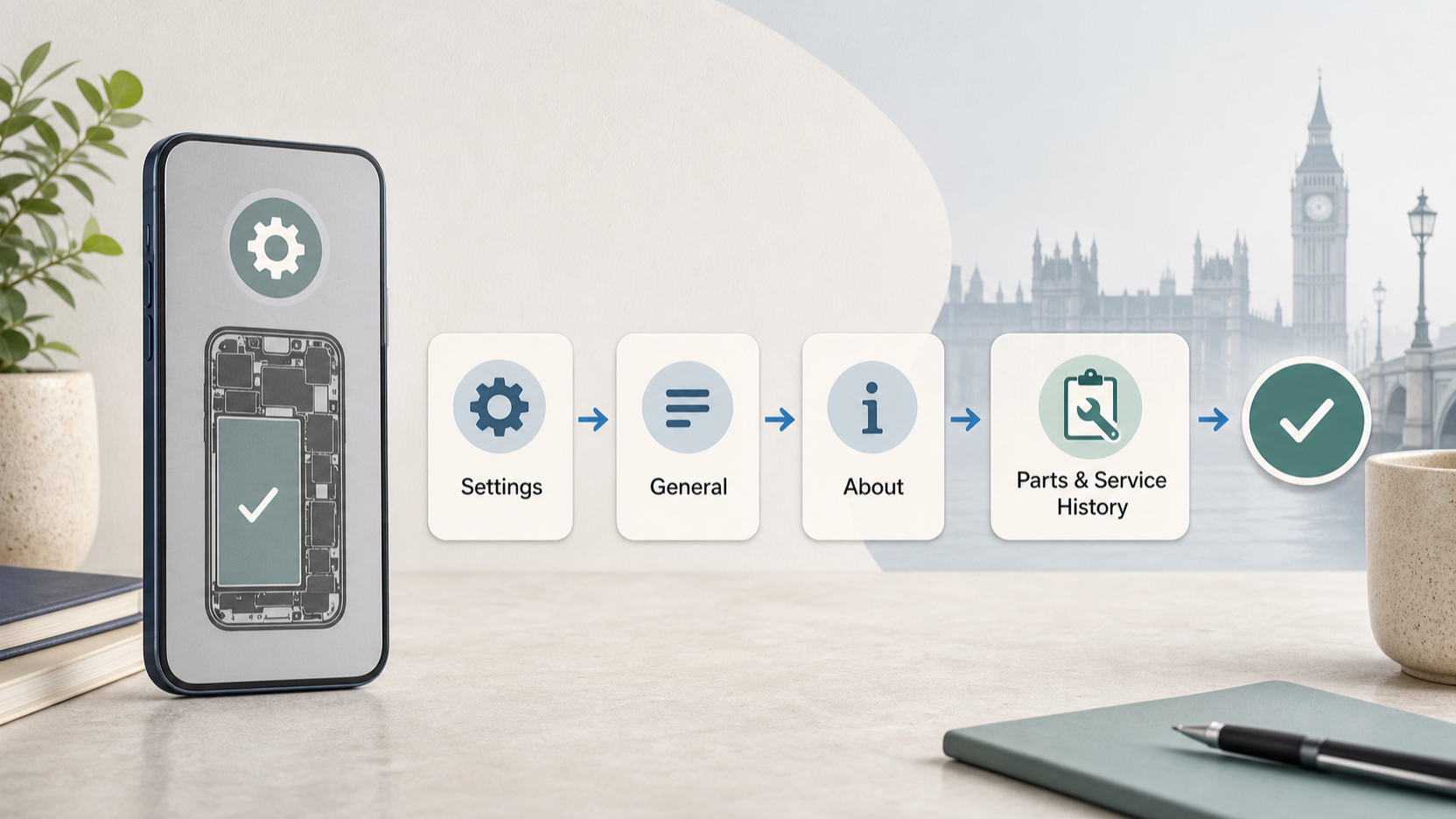 Decide how you will verify the repair before it happens. The practical aim is simple: confirm that the original fault is resolved and that the phone’s relevant functions work as expected, while retaining the quote, part details and any repair record. This is especially important where the device itself can provide repair-history information.
Apple says that on iPhones with iOS 15.2 or later, Parts and Service History is available through Settings > General > About when the phone has been repaired. Depending on the model and component, it can show messages such as Genuine, Unknown, Unverified or Used. Apple also says that these messages generally do not affect use unless the description says otherwise; an unverified logic board can affect certain features, including Apple Pay.
That check is useful both after repair and when assessing a used phone. It does not replace a model match before purchase: Apple notes that the information available depends on the iPhone model, and only the most recent service appears if a part has been serviced more than once.
Apple further explains that genuine parts are individually calibrated with manufacturing data. Treat calibration and any documented diagnostics as part of the repair scope, not an optional extra to discover once the handset is reassembled. Before approving a shop repair, ask which post-repair checks it performs and whether it will explain any device message that appears afterwards.
Compare DIY, Professional Repair and Replacement Costs
Compare complete options, not isolated prices. For DIY, include the listed part, delivery, tools or kit, consumables, your time and the cost of an unsuccessful attempt. For professional repair, include the identified part, labour, any diagnostic fee and the follow-up position if the repair does not solve the fault. For replacement, compare the price of a suitable alternative with the value you expect from your current phone after a successful repair.
The evidence you have collected should shape the comparison. An official original-part route, such as Samsung’s supported Self-Repair programme, may give you a clearer provenance route; it does not remove the need to confirm support for your model or account for warranty exposure. A Pixel part accompanied by a matching iFixit repair guide can make the DIY option easier to assess; it still leaves you to decide whether the procedure, tools and risk are acceptable.
Use a short written comparison. Put the three options in columns and record: exact model, diagnosed fault, named part or repair scope, all expected costs, warranty position, evidence of a model-specific procedure and the planned post-repair check. Mark any missing item as a reason to pause rather than quietly assuming it will work out.
Choose DIY when the part provenance, manual, total cost and verification plan are clear to you. Choose professional repair when diagnosis, process or warranty exposure remains uncertain but the phone still has enough value to justify a defined quote. Choose replacement when neither repair route offers convincing whole-life value after the missing information and risks are counted.
Your Pre-Payment Repair Checklist
Before buying a part or accepting a quote, confirm all of the following:
- I have recorded the exact phone model and the fault I am trying to solve.
- The part or quote identifies the component and states compatibility with that model.
- I can identify a documented source for the part, such as an official programme or the stated genuine Pixel parts source.
- I have found and read a credible model-specific manual far enough to understand the main steps and tools.
- I know whether an attempted repair could affect warranty cover; Samsung says resulting damage from a non-authorised attempt is not covered by warranty.
- I have included tools, kit, labour, time and failure risk in the comparison, not only the advertised part price.
- I know how the finished phone will be checked, including iPhone Parts and Service History where it is available.
- I will pause and seek a professional assessment if the fault, procedure or part compatibility remains uncertain.
A missing check is useful information. It means you do not yet have a decision-ready repair route.
Frequently Asked Questions
How can I check whether a replacement phone part is genuine before I buy it?
Start with your exact model and use a source that documents both the part and compatibility. Samsung’s UK Self-Repair programme says it sells original spare parts for supported products, while iFixit’s UK Google Phone catalogue identifies genuine Google Pixel parts by model. Keep the listing or quote details, but do not assume that a generic marketplace description proves provenance for your handset.
Should I attempt a phone repair if I can find parts but not a model-specific manual?
Not yet. Samsung says manuals and repair guides can be found by model code or product category for supported products, and iFixit says it offers repair manuals for Pixel devices. Without a credible guide for the same model and repair, you have not established the required tools, sequence or realistic scope. Compare a professional assessment or replacement instead.
Can a phone show whether it has been repaired with genuine or previously used parts?
For eligible iPhones, Apple says Parts and Service History is available in Settings > General > About after repair. Depending on the device and part, it can show Genuine, Used, Unknown or Unverified information. Availability varies by iPhone model and iOS version, so use it as a post-repair check rather than a universal test for every phone.
When is it more sensible to choose professional repair instead of DIY?
Choose professional repair when you cannot confirm the fault, lack a matching procedure, are not comfortable with the documented process or cannot accept the warranty risk of a failed attempt. Samsung specifically says damage caused by an attempted repair outside an authorised service centre is not covered by warranty. Ask for a quote that identifies the part, labour and post-repair checks, then compare its complete cost with DIY and replacement.
Sources
Related reading
- Apple iPhone repair support review: genuine parts, tools, manuals, calibration and limitations
- iFixit mobile repair review: device guides, replacement parts, tool range and practical limits
- How screen, battery and charging-port repairs differ in difficulty, parts support and post-repair checks
- When repairing an older phone offers better value than replacing it
Editorial information: About our editorial team · Read our editorial policy · Read our affiliate disclosure.